Note
Go to the end to download the full example code
A SPICE-Based Simulation Workflow in IPKISS
This tutorial demonstrates a powerful and efficient workflow for circuit simulation that uses SPICE netlists generated from a CircuitModelView.
The tutorial will guide you through:
Defining an IPKISS circuit and generating a SPICE netlist from it.
Loading the generated SPICE netlist for simulation.
Using this workflow for an efficient parameter sweep, showcasing how to modify circuit parameters directly within the netlist.
Key Advantages of a SPICE-Based Workflow:
Persistence and Reusability: A SPICE file is a standalone, text-based representation of your circuit. It can be version-controlled, shared, and simulated independently from the original IPKISS Python code, which is ideal for collaboration and design archiving.
Flexibility: For analyses requiring many simulations, such as parameter sweeps, modifying a text-based netlist is more flexibile than regenerating them from complex circuits.
Standardization and Integration: SPICE is an industry standard. A SPICE-based workflow allows for easy integration with a wide range of external simulation and analysis tools.
import si_fab.all as pdk
import ipkiss3.all as i3
import matplotlib.pyplot as plt
import numpy as np
from pathlib import Path
import caphe
1. Defining Our Test (a balanced MZI) and Generating its SPICE Netlist
First, we define a Mach-Zehnder Interferometer (MZI) with a thermo-optic phase shifter in one arm. The heater_voltage property will be the parameter we sweep.
class MZI(i3.Circuit):
    """MZI with a thermo-optic phase shifter in one arm."""

    coupler = i3.ChildCellProperty(doc="Input/output coupler cell")
    waveguide_template = i3.ChildCellProperty(doc="Waveguide template for the reference arm")
    arm_length = i3.PositiveNumberProperty(default=200.0, doc="Length of both MZI arms [um]")

    # Heater model parameters (used in the heated arm circuit model).
    # This will be replaced in the SPICE netlist for sweeps
    heater_voltage = i3.NumberProperty(default=0.0, doc="Heater DC bias [V]")
    p_pi_sq = i3.PositiveNumberProperty(default=0.05, doc="Heater power for pi-phase per square [W]")

    def _default_coupler(self):
        return pdk.SiDirectionalCouplerSPower(power_fraction=0.5, target_wavelength=1.55)

    def _default_waveguide_template(self):
        return pdk.SWG450()

    def _default_specs(self):
        # The heater_voltage property is used here to define the initial DC bias
        # for the HeatedWaveguide's circuit model.
        # This parameter will be targeted for replacement in the SPICE netlist.
        heated_arm = pdk.HeatedWaveguide(name=f"{self.name}_heated_arm")
        heated_arm.Layout(shape=[(0.0, 0.0), (self.arm_length, 0.0)])
        heated_arm.CircuitModel(v_bias_dc=self.heater_voltage, p_pi_sq=self.p_pi_sq)

        reference_arm = pdk.RoundedWireWaveguide(
            name=f"{self.name}_reference_arm",
            trace_template=self.waveguide_template,
        )
        reference_arm.Layout(shape=[(0.0, 0.0), (self.arm_length, 0.0)])

        return [
            i3.Inst(["dc_in", "dc_out"], self.coupler),
            i3.Inst("heated_arm", heated_arm),
            i3.Inst("reference_arm", reference_arm),
            i3.Place("dc_in:in1", (0.0, 0.0)),
            i3.Join(
                [
                    ("dc_in:out1", "heated_arm:in"),
                    ("dc_in:out2", "reference_arm:in"),
                    ("dc_out:in1", "heated_arm:out"),
                    ("dc_out:in2", "reference_arm:out"),
                ]
            ),
        ]

    def _default_exposed_ports(self):
        return {
            "dc_in:in1": "in1",
            "dc_in:in2": "in2",
            "dc_out:out1": "out1",
            "dc_out:out2": "out2",
            "heated_arm:elec1": "heater_gnd",
            "heated_arm:elec2": "heater_v",
        }


def create_and_simulate_spice_netlist(cell, wavelengths, filename):
    """Generates a SPICE netlist from the MZI cell and saves it to a file."""

    cur_dir = Path.cwd()
    spice_filepath = cur_dir / filename

    print(f"Generating SPICE netlist to: {filename} and run simulations")
    # This call generates the SPICE file and performs an initial simulation by providing the spice_path argument.
    S = cell.CircuitModel().get_smatrix(wavelengths=wavelengths, spice_path=spice_filepath)
    return S
2. Using the SPICE Netlist for Efficient Voltage Sweeps
With the SPICE file generated, we can now use it to perform different analyses. This section demonstrates how to conduct an efficient voltage sweep by directly manipulating the parameters within the loaded SPICE netlist.
def simulate_voltage_sweep_from_spice(spice_filepath, voltages):
    """
    Performs a voltage sweep simulation directly from a SPICE netlist.
    This method efficiently updates parameters within the netlist for each sweep point.
    """
    print(f"Starting voltage sweep simulation from SPICE file: {spice_filepath}")

    # Load the base SPICE netlist.
    netlist = caphe.SpiceNetlist.from_spice(spice_filepath)

    t_out1 = []
    t_out2 = []

    for v_heater in voltages:
        # Create a new netlist by replacing the heater voltage parameter.
        # The parameter name `heated_arm_v_bias_dc` is derived by IPKISS
        # from the HeatedWaveguide instance name ('heated_arm') and its CircuitModel parameter ('v_bias_dc').
        new_netlist = netlist.replace(
            {"heated_arm_v_bias_dc": v_heater},
        )
        smatrix = caphe.run(new_netlist)

        # We select the transmission at a specific wavelength.
        # The middle index (50) corresponds to 1.55 um.
        t_out1.append(np.abs(smatrix["out1", "in1"][50]) ** 2)
        t_out2.append(np.abs(smatrix["out2", "in1"][50]) ** 2)

    return np.array(t_out1), np.array(t_out2)
3. Run SPICE-based simulations
Instantiate MZI circuit with an initial heater voltage of 0.0V. This initial voltage is what will be written into the SPICE netlist.
mzi_cell = MZI(arm_length=200.0, p_pi_sq=0.05, heater_voltage=0.0)
3.1. Generating the SPICE Netlist File
Now, we generate the SPICE netlist from our defined MZI circuit. The spice_path argument in get_smatrix is crucial here, as it instructs IPKISS to output a SPICE file.
spice_file_name = "mzi_netlist.spc"
wavelengths = np.linspace(1.54, 1.56, 101)
S = create_and_simulate_spice_netlist(mzi_cell, wavelengths, spice_file_name)
S.visualize(term_pairs=[("in1", "out1")], scale="dB")
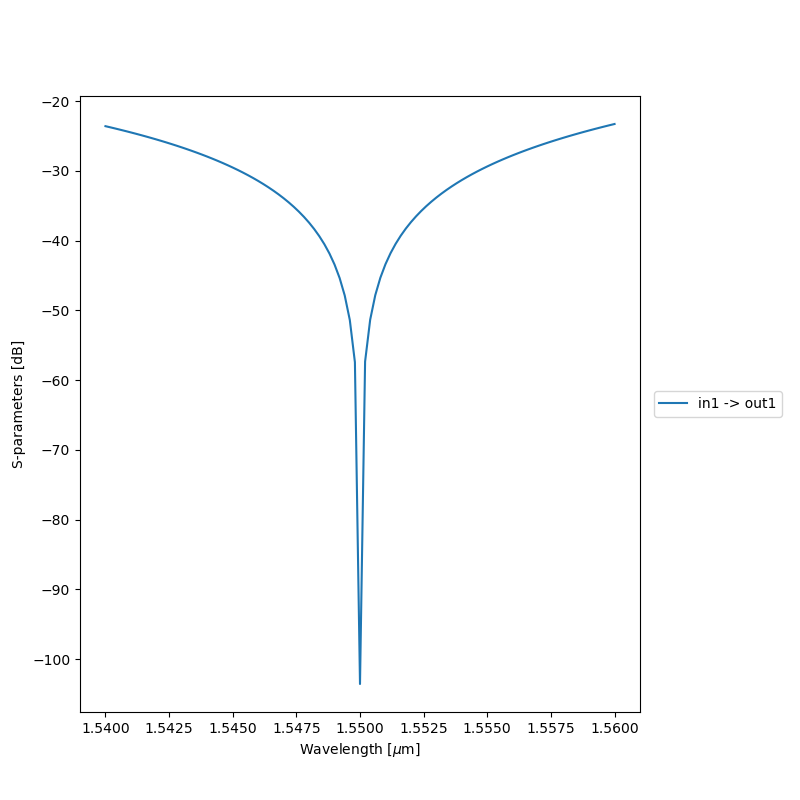
Generating SPICE netlist to: mzi_netlist.spc and run simulations
3.2. Executing the Voltage Sweep and Visualizing Results
Finally, we run the voltage sweep using the generated SPICE netlist and plot the resulting transmission spectra.
voltages = np.linspace(0, 2, 51)
transmission_out1, transmission_out2 = simulate_voltage_sweep_from_spice(spice_file_name, voltages=voltages)

# Plotting the results
plt.figure(figsize=(8, 5))
plt.plot(voltages, transmission_out1, label="in1 -> out1")
plt.plot(voltages, transmission_out2, label="in1 -> out2")
plt.xlabel("Heater voltage [V]")
plt.ylabel("Transmission")
plt.title(f"MZI Voltage Sweep from SPICE Netlist at {wavelengths[50]:.3f} um")
plt.grid(True, alpha=0.3)
plt.legend()
plt.tight_layout()
plt.show()
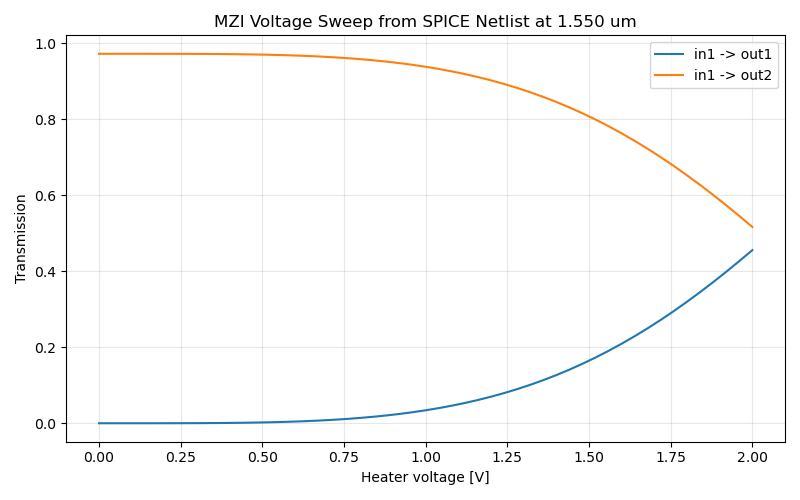
Starting voltage sweep simulation from SPICE file: mzi_netlist.spc
Conclusion
This tutorial demonstrated a powerful workflow for circuit simulation:
Defining your circuit as an IPKISS PCell.
Generating a reusable SPICE netlist from the CircuitModelView of the PCell.
Performing efficient parameter sweeps directly on the SPICE netlist using caphe.
This approach is highly beneficial for extensive analysis, sharing designs, and integrating with other SPICE-compatible tools.
Check your current directory for the generated mzi_netlist.spc file. You can now share or reuse this file for further analysis without needing the original cell definitions in Python.