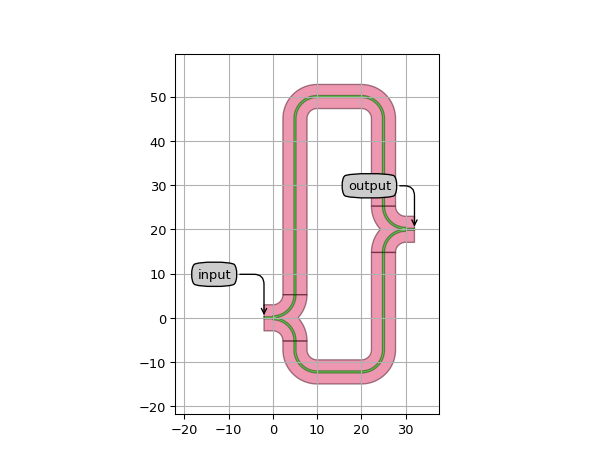
place_and_route
- ipkiss3.all.place_and_route(insts=None, specs=None, strict=None, layout=None)
Function to place and route a series of instances with the help of placement specifications and connectors.
The supported instance specifications, placement specifications and connectors can be found under the i3 namespace (see also Placement and routing reference and Connector reference).
Always be as specific as possible when providing the placement specifications. The placement engine will change the positions of instances that are specified in the specifications list.
For instance, if you have multiple specs without using Place, that tells the placement engine that the location of the full circuit (or at least that one instance) is not important. The instances will still be placed relative to each other as specified, but their position might change when you add more specs. By using Place, you anchor your circuit.
You can chain multiple calls of this function after each other where the output of one call is the input to the layout argument on the next call.
The function will never modify the input layout object, but will return a new layout object.
Deprecation note: The insts parameter is deprecated and will be removed in the future. Certain new features might not work if you keep using it. Instead use the
i3.Instspec to add instances to the layout. In order to chain multiple place_and_route call, pass the output of one call into the layout argument of the next.- Parameters:
- insts: InstanceDict or dict or Layout, optional
(deprecated) In case of a dictionary, it has the form of {inst_name: PCell/Layout view}.
- specs: Iterable, optional
List of placement specifications and connector specifications between ports. When insts is omitted, pass specs by keyword (e.g. place_and_route(specs=…)).
- strict: bool, optional
If True, any routing error will raise an exception and stop the program flow. If False, any routing error will give a warning and draw a straight line on an error layer. See
i3.ConnectLogicalfor more information. Default is True.- layout: Layout, optional
The layout object contain previously added instances. Cannot be used together with insts. The layout object to input here will either be the layout parameter of the generate function, or the output of a previous place_and_route call. To use an existing layout, either pass a Layout as the first positional argument or use the layout keyword argument.
- Returns:
- InstanceDict or Layout
If the input insts argument is an InstanceDict or dict, the function returns an InstanceDict containing the placed instances and any created waveguides.
If the input insts argument is a Layout object, if insts is omitted, or if the layout argument is provided, the function returns a new Layout instance which includes the original ports and elements, along with the newly placed instances and created waveguides.
See also
ipkiss3.all.CircuitConvenience PCell that uses place_and_route internally.
ConnectManhattanConnectBendConnectManhattanTaperedConnectLogicalCircuitexpose_ports
Examples
import si_fab.all as pdk
import ipkiss3.all as i3
from picazzo3.wg.splitters import WgYSplitter, WgYCombiner

class MyPCell(i3.PCell):
    class Layout(i3.LayoutView):
        def generate(self, layout):
            layout = i3.place_and_route(
                layout=layout,
                specs=[
                    i3.Inst("splitter", WgYSplitter()),
                    i3.Inst("combiner", WgYCombiner()),
                    i3.Place("splitter", (0, 0)),
                    i3.Place("combiner", (30, 20), relative_to="splitter"),
                    i3.ConnectManhattan(
                        "splitter:arm2",
                        "combiner:arm2",
                        control_points=[i3.H(50)],
                        bend_radius=5.0,
                    ),
                    i3.ConnectManhattan(
                        "splitter:arm1", "combiner:arm1", "wg_name", bend_radius=5.0
                    ),
                ],
            )
            layout += i3.expose_ports(
                layout, {"splitter:center": "input", "combiner:center": "output"}
            )
            return layout

pcell = MyPCell()
pcell_lo = pcell.Layout()
pcell_lo.visualize(annotate=True)