Release notes Luceda Photonics Design Platform 2026.03.0
Welcome to the 2026.03.0 release!
Discover the key highlights:
Irys DRC - A new native design rule check engine integrated within the Luceda Photonics Design Platform, enabling interactive real-time visualization and script-based verification of PIC layouts against foundry-specific rule decks.
Tape-out preparation - Advanced dummy filling functionality featuring simultaneous multi-layer support and secondary dummy fill step.
SPICE-based circuit simulation - Export a SPICE netlist from IPKISS and load that netlist directly into the Caphe circuit simulator for efficient parameter sweeps and simulations.
Visual P&R assistance - Improved visual P&R assistance that allows designers to easily identify connectors and verify their control points and relative definitions within the Layout Visualizer.
For a full list of features, improvements, and bug fixes, please consult the changelog.
Irys DRC
The Luceda 2026.03 release introduces Irys DRC, a native design rule check (DRC) engine integrated in the Luceda Photonics Design Platform. Designed to verify PIC layouts for foundry compliance, Irys DRC brings verification closer to the design phase. This allows you to detect and fix manufacturability errors during the design layout phase, rather than waiting until right before tape-out.
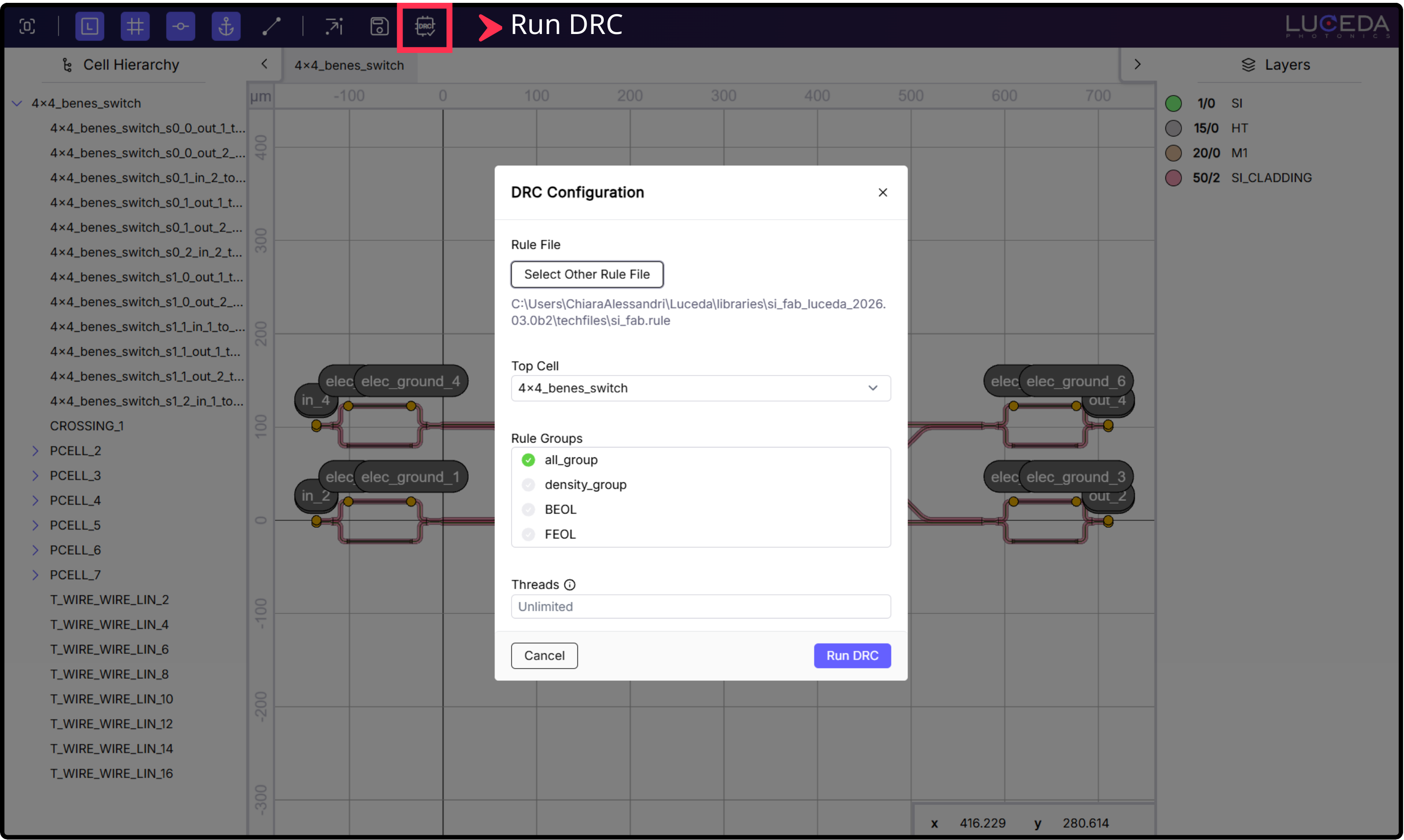
Running Irys DRC from the Luceda Layout Visualizer.
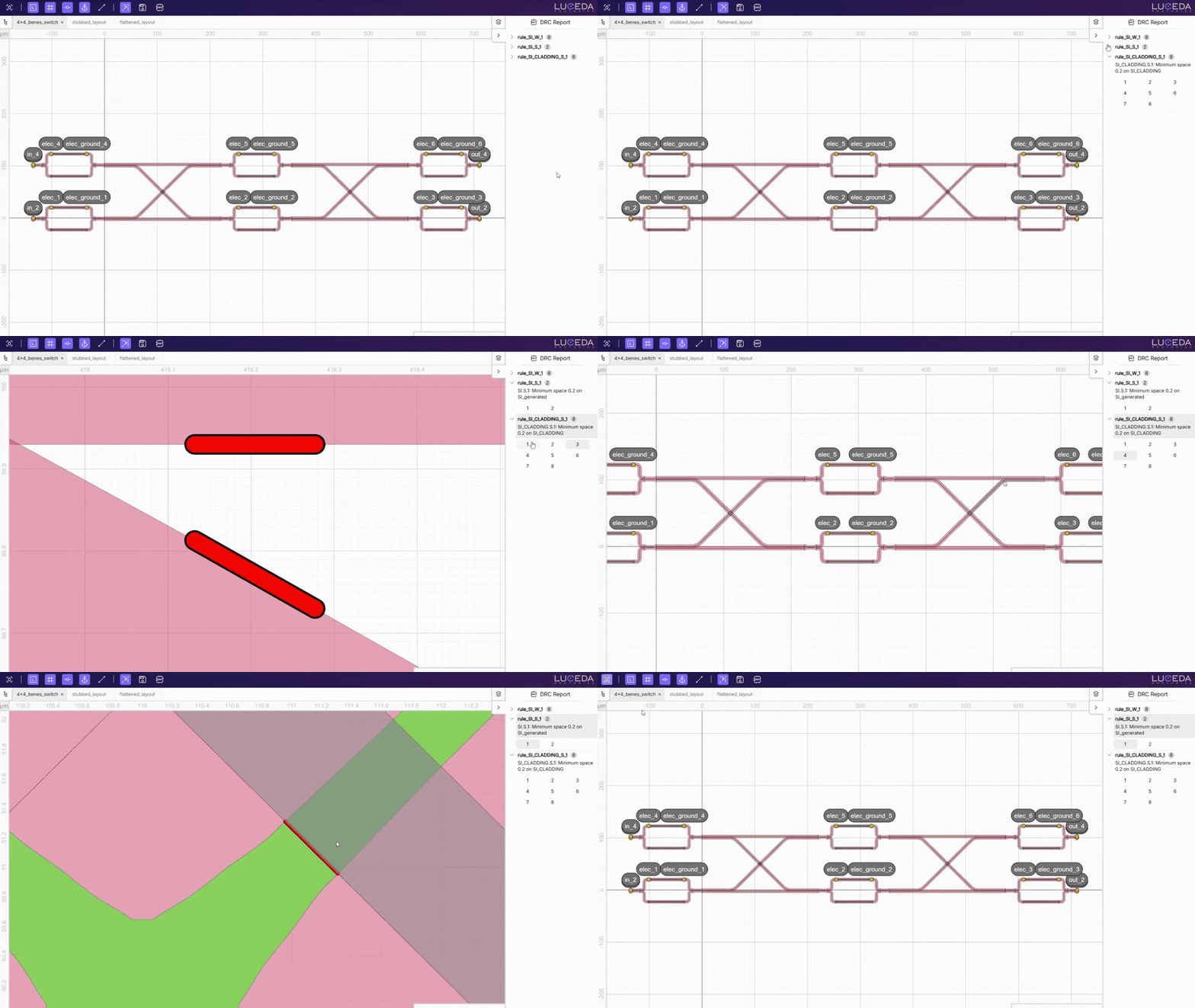
Browsing the DRC report in the Luceda Layout Visualizer.
Key features of Irys DRC include:
Integrated workflows: Run checks directly within the Luceda Layout Visualizer to get immediate feedback on your PIC layout, or use Python scripting for automated GDSII-based regression testing.
Rule selection: Filter by specific rule groups, such as metal layers, density, or acute angles, to manage computational load and resolve errors incrementally in complex designs.
Cell selection: Run Irys DRC on your full design, or select specific subcells to perform faster, targeted checks on smaller sections of the layout.
Built-in density checks: Automatically perform density checks using Luceda’s new advanced dummy filling capabilities, according to foundry-specified settings.
Multi-threaded execution: Speed up checks on large-scale layouts while keeping control over system resource allocation.
Standardized output: Generate
.lyrdbmarker files, allowing inspection in any layout viewer tool of your choice (such as KLayout).
To learn how to run Irys DRC on your designs, see the following tutorial: Irys DRC.
For up-to-date information regarding foundry DRC decks supported by Irys DRC, visit: Irys DRC.
Tape-out preparation: Advanced dummy filling
The improved dummy filling functionality in Luceda 2026.03 introduces i3.Filler, providing the flexibility to perform dummy filling on different layers simultaneously using independent settings.
In addition, you can now execute a secondary dummy filling step on an already dummy-filled layout, using different settings or geometries.
Dummy filling remains available for both Layout views and GDSII files:
Layout View: Use
i3.dummy_fill_layoutto apply fill directly to an IPKISS Layout while designing.GDSII: Use
i3.dummy_fill_gdsiito post-process existing GDSII files.
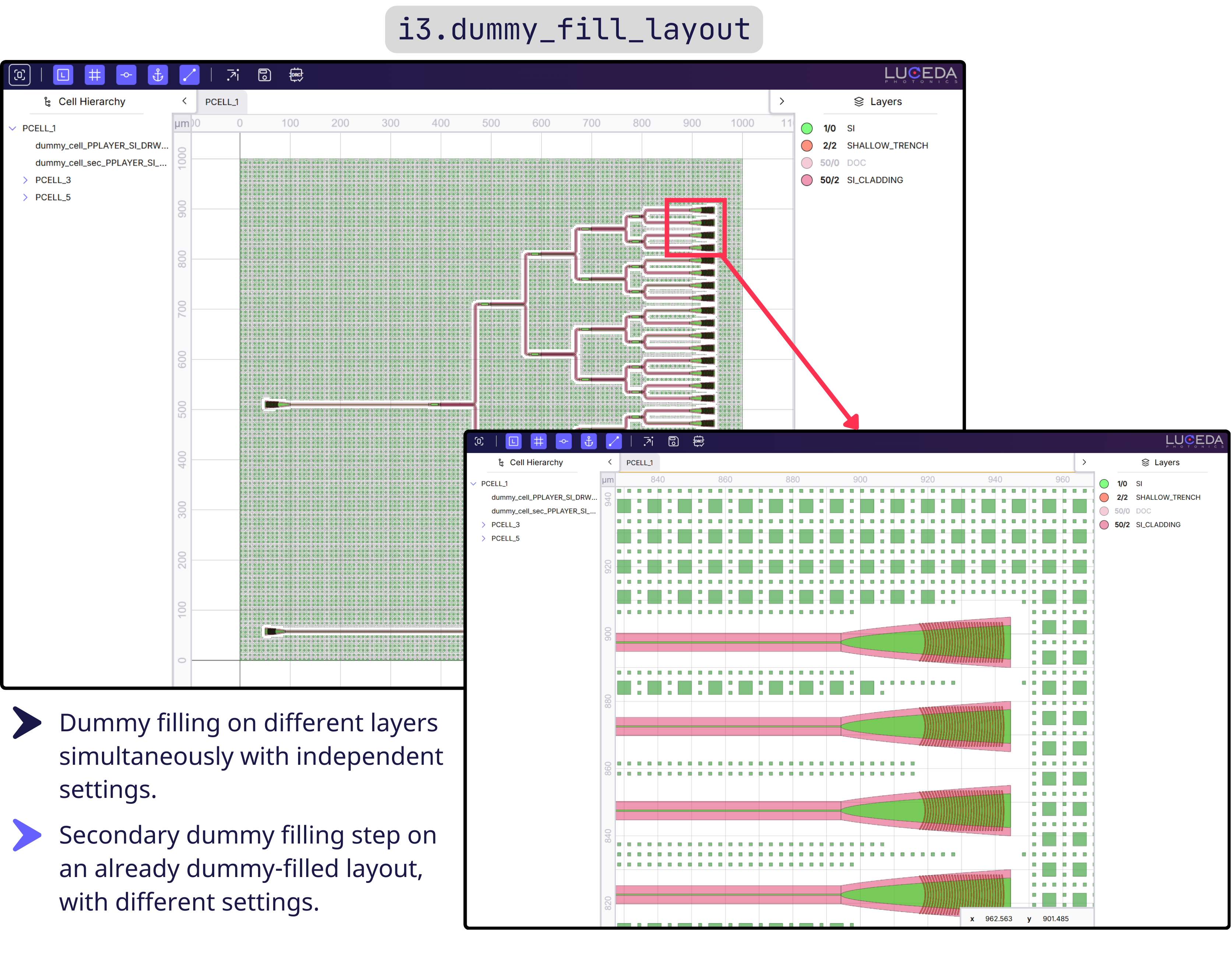
Dummy filling a layout using the new Luceda dummy filling functionality.
SPICE-based circuit simulation
IPKISS now has support for SPICE-based circuit simulation workflows. You can export a SPICE netlist from IPKISS and load that netlist directly into the Caphe circuit simulator.
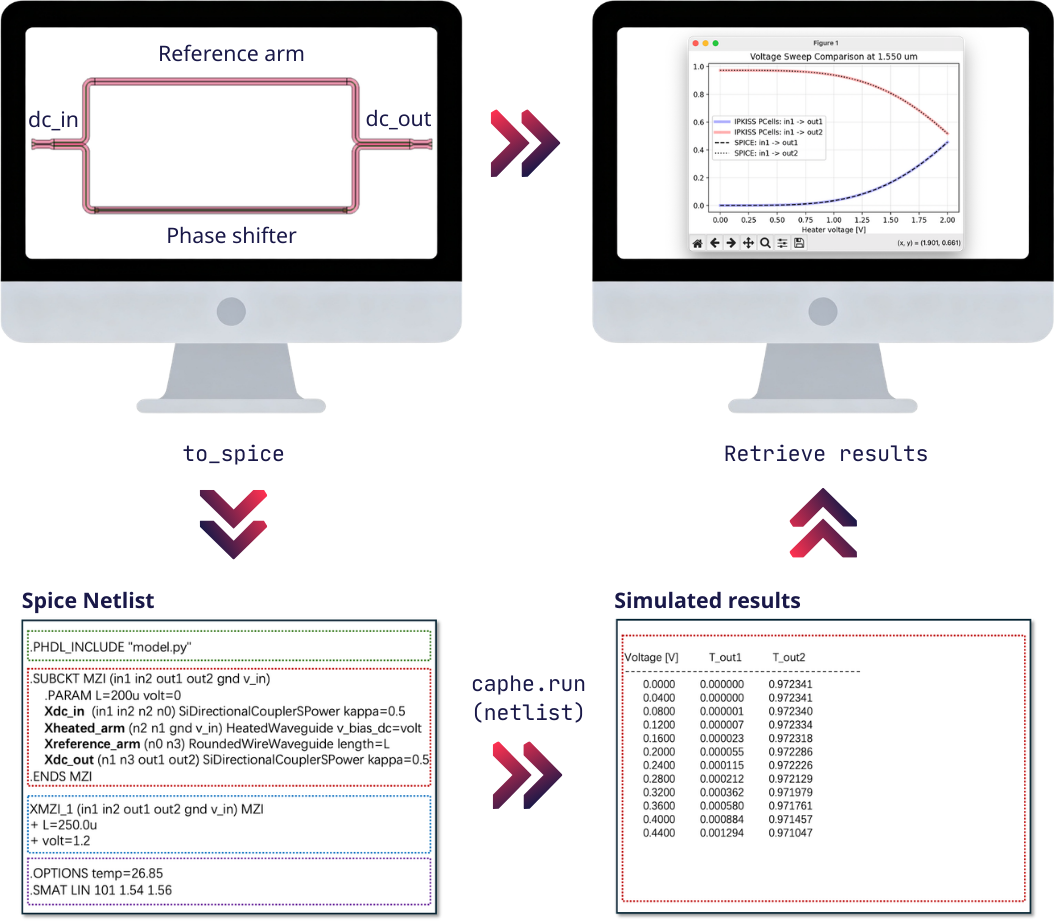
SPICE-based circuit simulation workflow.
This brings several benefits:
Reproducible simulation input: You can rerun simulations at any time from a SPICE file, without rebuilding the circuit in IPKISS code.
Decoupled simulation runtime: SPICE-based simulation can run independently from the IPKISS runtime, requiring only the Caphe simulator for repeated simulations.
Better transparency for debugging: The SPICE netlist shows exactly what is being simulated, making setup and model debugging easier.
What-if analysis: You can modify netlist parameters after export (for example bias voltage values) to perform sweeps and simulations with different conditions.
EDA interoperability: SPICE is a standard format in the EDA ecosystem, allowing for better integration with other tools.
Resources:
API documentation: Running circuit simulations.
Sample gallery: A SPICE-Based Simulation Workflow in IPKISS.
Samples in Luceda Academy: check the
samples/circuit_sim/spicedirectory.
Visual P&R assistance
The 2026.03 release provides enhanced visibility into how components are connected to each other in your PIC layouts.
When visualizing a PCell in the Luceda Layout Visualizer, connectors are now clearly identified by a connector icon. By clicking an icon, you can interactively inspect the connector’s control points and visualize exactly which reference point or coordinate system they were defined against. This simplifies debugging of complex routing, making it easier to iterate on your circuit designs.
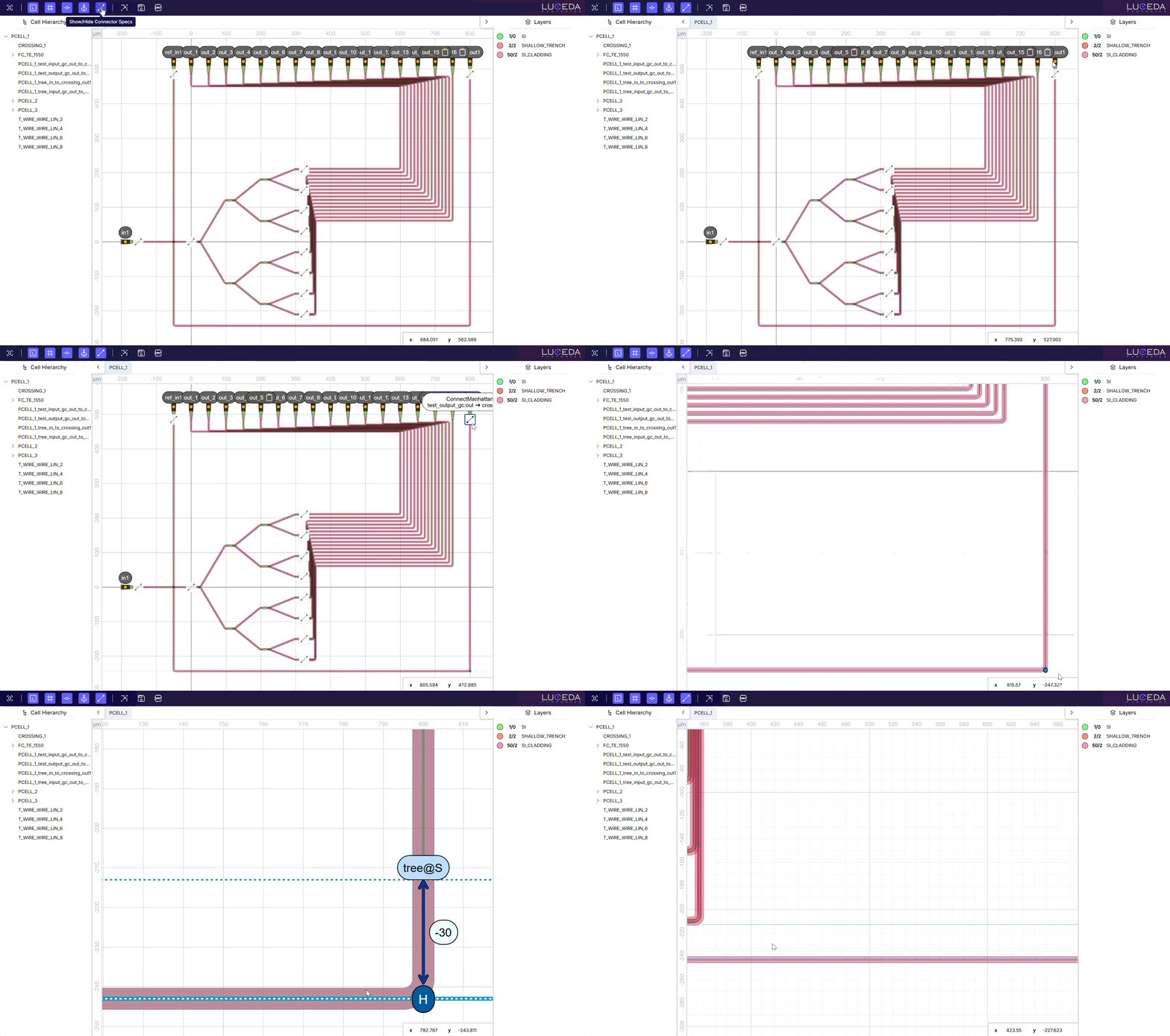
Visualizing and browsing connectors in the Luceda Layout Visualizer.