PDK Creation
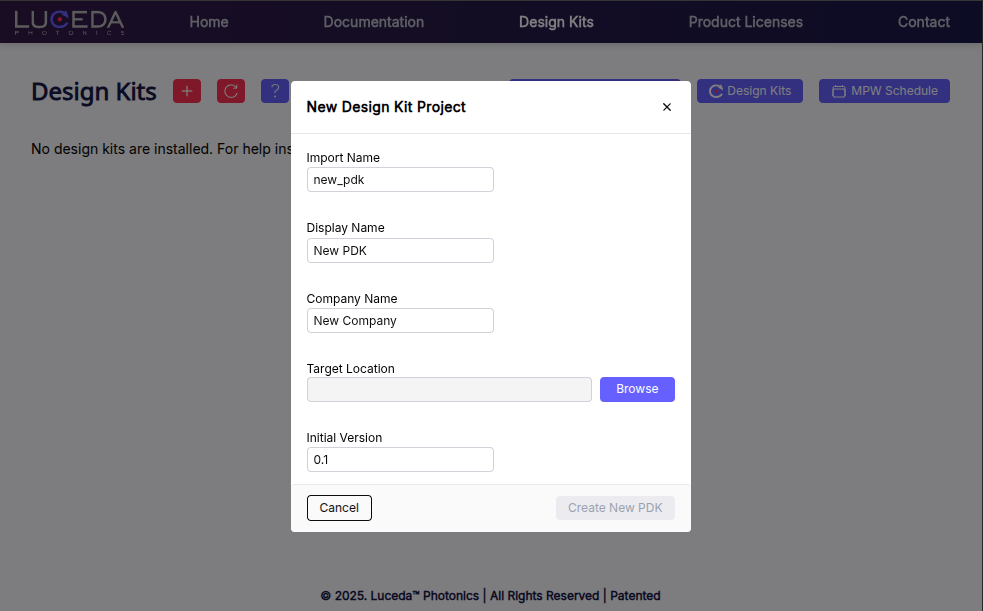
The fastest and most convenient way to kickstart the creation of your PDK is by using the form in the Luceda Control Center. To access the form, launch the Luceda Control Center and open the Design Kit tab. Click the “New Design Kit Project” button and complete the fields in the form.
After completing the form, a standard file structure for a minimal PDK will be generated. If you have the PyCharm IDE installed, the project will be launched automatically. If you do not have PyCharm installed, the directory will be opened in your file explorer.
After opening the project, follow the steps in the README.md to get you through the steps of creating, building and verifying your PDK:
Defining the layers and purposes
Defining the GDSII export map
Adding components and waveguide templates
Inspecting your PDK.
The PDK development tutorial applies the above mentioned steps in detail to the Cornerstone Ge-on-Si process.
You can find more in-depth information on building design kits in the dedicated design kit guide here on Luceda Academy.